USF Association Platform

My first fully AI-built product, with no development team and not one line of code written by hand. A complete digital platform for a Croatian sports physiotherapists' association: public site, member dashboard, admin panel, and brand system. I made every design decision. AI wrote every line of code, and you can log in below and try the result yourself.
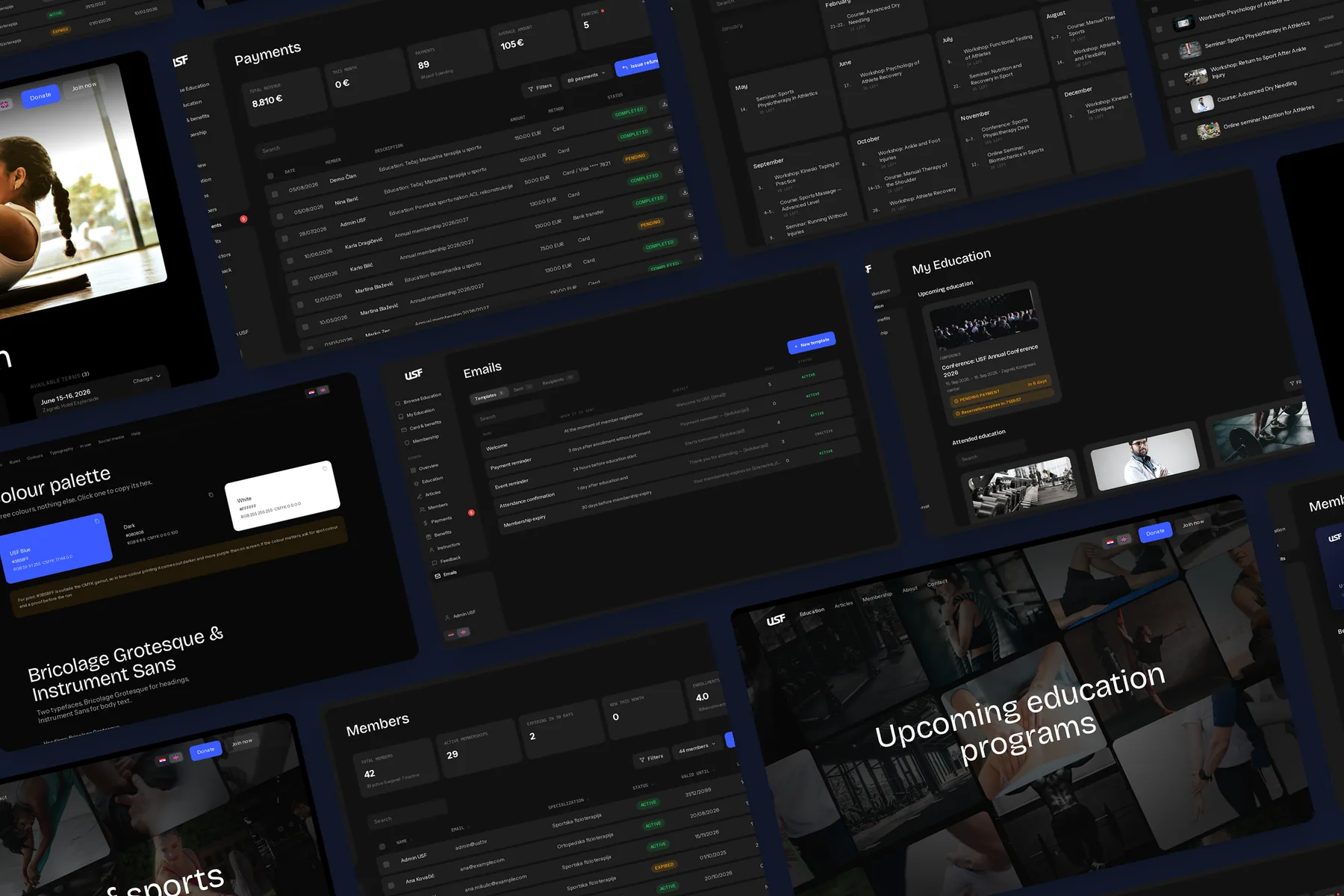
USF Association Platform — public site, member dashboard, admin panel and brand system

Project overview

USF (Udruga sportskih fizioterapeuta) is a Croatian association of sports physiotherapists. They needed everything: a public site that explains who they are, education listings with terms and enrolment, a member area with a digital card and benefits, an admin panel to run it all, and a brand to hold it together. Normally that's a brief for a whole team: designer, developers, PM, brand studio. This time it was me and an AI pair working in documented rounds: I decided, it built, I reviewed. Nothing shipped without my yes.

Enter the platform

Don't take my word for it. The whole prototype runs live, right here, filled with demo content: seeded members, two years of educations, payments, ratings and emails. No sign-up, no password, just pick a role and you're in. Everything you change stays in your own browser.

Open as admin Open as member Browse the public site

One designer, zero developers

The association needed a real product, not a landing page: educations with terms, prices and enrolment, membership with a card and benefits, payments with refunds and credits, emails that go out at the right moment, analytics, roles and permissions, all of it in two languages. The kind of scope where a designer normally hands off wireframes and waits.

There was no one to hand off to. The experiment was to close that gap with AI: could I direct an AI the way I'd brief a development team, and end up with something a client can click through and believe?

Constraint 01

Words instead of wireframes

Most decisions travelled as language, not layouts. I described what was wrong with a screen in a voice note (transcribed, sometimes garbled), and the AI had to decode the intent, propose a fix, and show me before/after images before touching anything.

Constraint 02

A prototype that must feel true

A clickable demo with three rows in a list convinces nobody. This one carries two years of seeded history (enrolments, payments, ratings, cancellations), so every screen shows what the association would actually see on a normal Tuesday.

Constraint 03

Quality without reading the code

I don't review code line by line. So the process had to prove itself differently: computed styles measured instead of eyeballed, scripted walks through every panel, and a written rule for anything we decided twice.

The method

Sketch first, decide after

Every round ran the same way. I sent notes, usually by voice. The AI built the proposal in a scratch copy and sent back before/after images. Only after my yes did it touch the real files, and permission applied to that one round only. It never carried over to the next.

I decided. It built. I reviewed. Twenty-nine documented rounds, and counting.

A design notebook instead of a changelog

There was no research phase to borrow confidence from. The rigour lives in the process instead: every round is written down in a running handoff document: what changed, what broke, and the lesson that came out of it. It briefs the next session in minutes, so nothing is ever lost between rounds, and a mistake made once is a rule forever after.

29
documented build rounds, from the first sketch of the public site to association analytics. Each round: my notes in, before/after sketches back, my approval, then the real files. The handoff document keeps every lesson. It reads less like a changelog and more like a design notebook.

A rule from the notebook

"Measure, don't look." A heading I flagged four rounds in a row stayed wrong for the same reason every time: the fix was judged by eye on a screenshot. It got fixed the round we started reading computed styles off the live page: the reference heading measured 18px/500, the broken one 16px/700, and suddenly it wasn't a matter of taste anymore. Screens lie; computed values don't.

Five deliverables, one system

It shipped as one connected system: a public site that explains and enrols, a member side worth logging into, an admin panel that runs the association, a brand that outlives the prototype, and written rules that keep it all one product.

Deliverable 01

A public site that explains and enrols

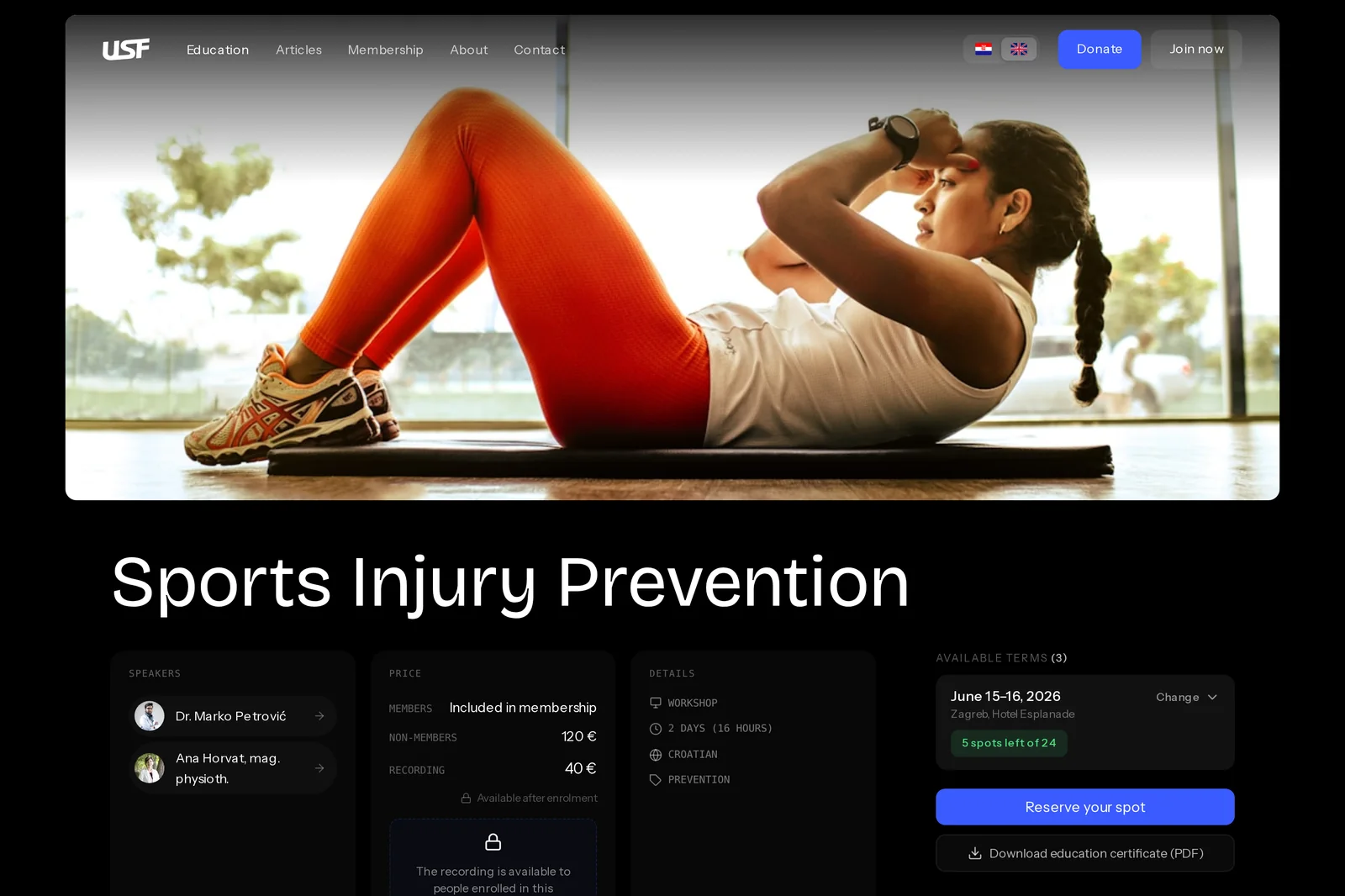
A dozen public pages in Croatian and English: educations with terms, locations and prices, speaker profiles, articles, membership, donations. An education opens like a product page (speakers, price, details, available terms with spots left) before the long description.

Members see "included in membership" where non-members see a price. Every education, term and price is one shared record, so the public page, the member's view and the admin always tell the same story.

USF education detail page with speakers, pricing and available terms
Deliverable 02

A member side worth logging into

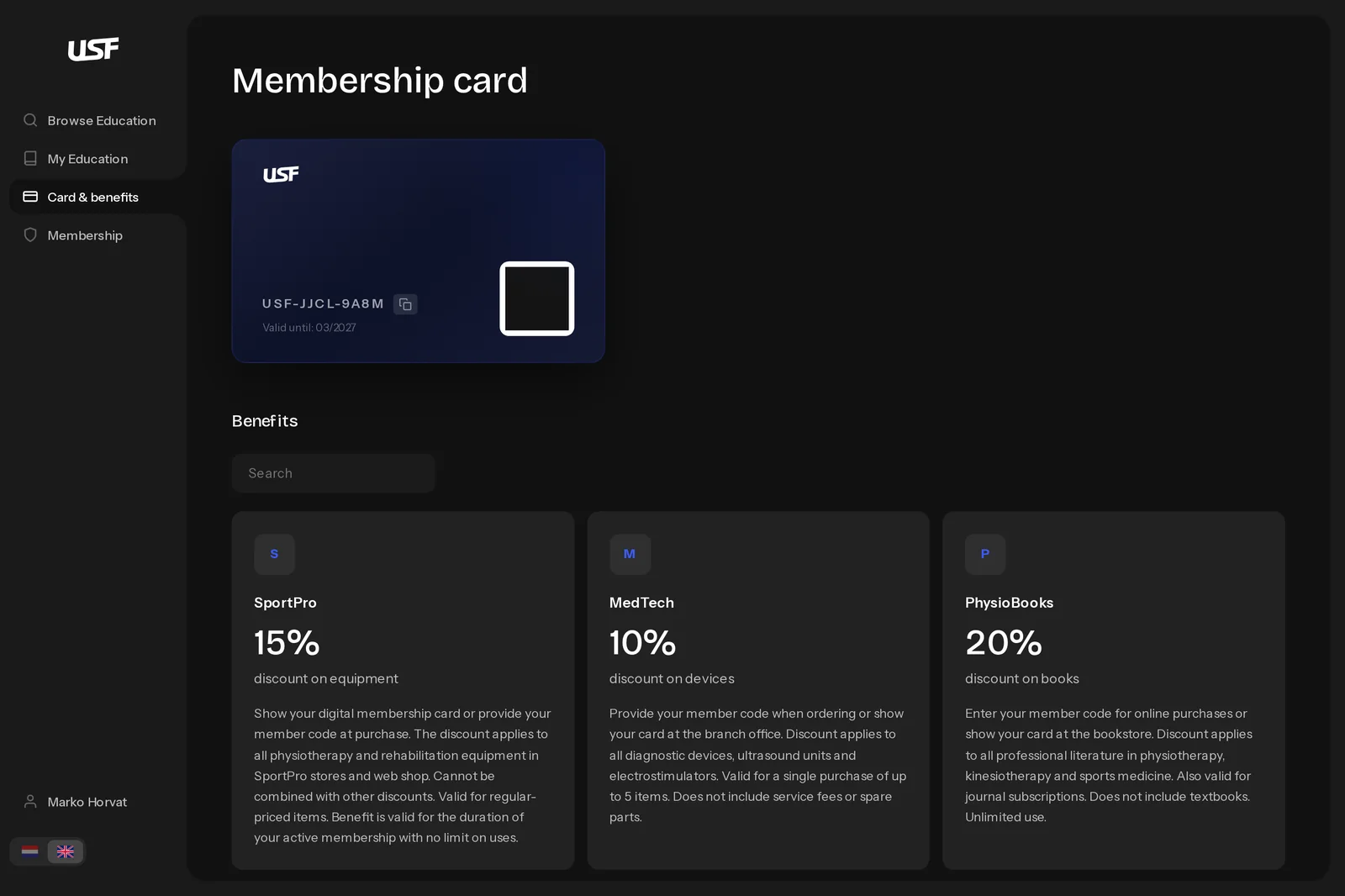
The digital card carries the code partners ask for, and every benefit leads with the one number a member actually wants: 15% set large, the sentence set quiet under it. The most important figure on the card had been wearing the smallest type in the system; ranking the content and letting the sizes say the ranking fixed it.

Members see their educations, payments, refund credits and certificates. When a membership lapses, benefits dim but stay readable: the offer isn't hidden, it's marked unusable.

USF member dashboard with digital membership card and benefits
Deliverable 03

An admin panel that runs the association

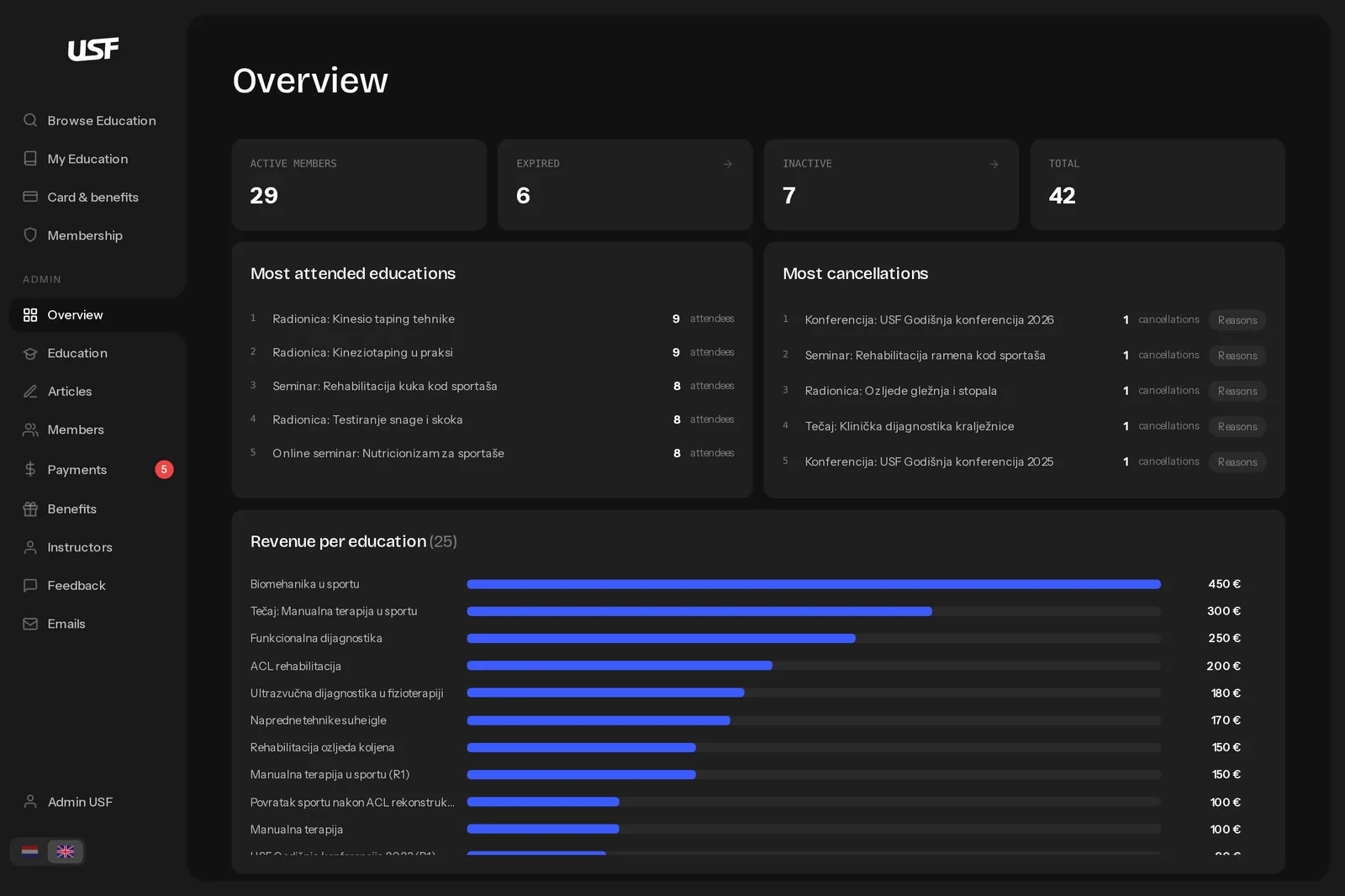
Members, educations with per-term publishing, payments with refunds and credit, feedback, analytics, role-based permissions, plus an email system with templates, sends and per-person deliveries, built to answer the question every admin eventually asks: "did Ana get it?"

Every screen has an address, so the browser's back button walks the app instead of leaving it. Switching language re-renders whatever is open. Nothing dead-ends.

USF admin overview with member counts, rankings and revenue per education
Deliverable 04

A brand bigger than the prototype

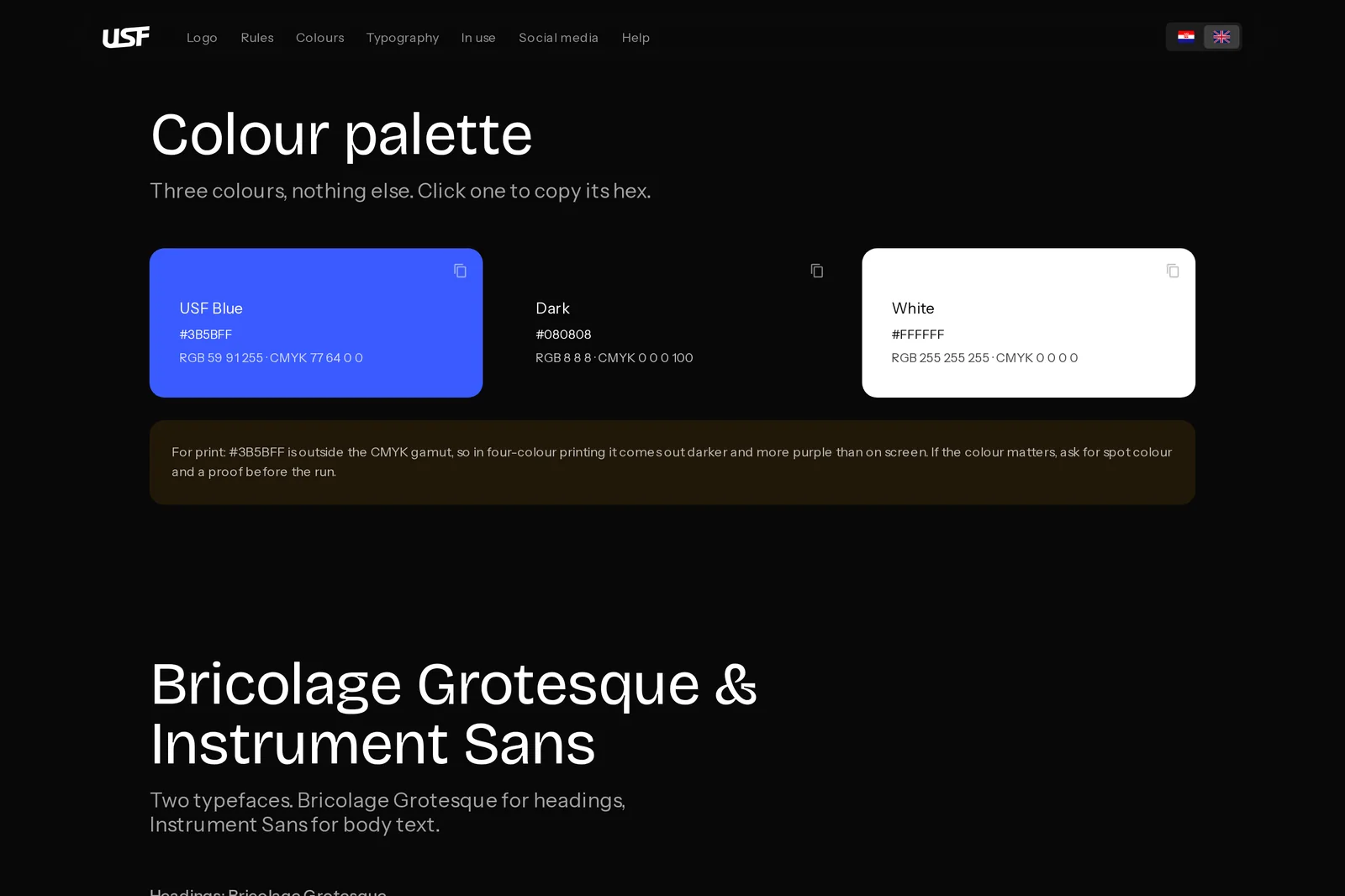
Three colours, two typefaces, one voice. USF Blue is for actions only: in this system colour is meaning, not decoration. Bricolage Grotesque carries the headlines, Instrument Sans the text, mono uppercase the labels.

The guidelines are their own site, covering logo rules, palette with print warnings, typography, social templates and downloadable files. You can open them here, alongside an email signature and merch mockups.

USF brand guidelines, three-colour palette with print warning
Deliverable 05

Rules that keep it one product

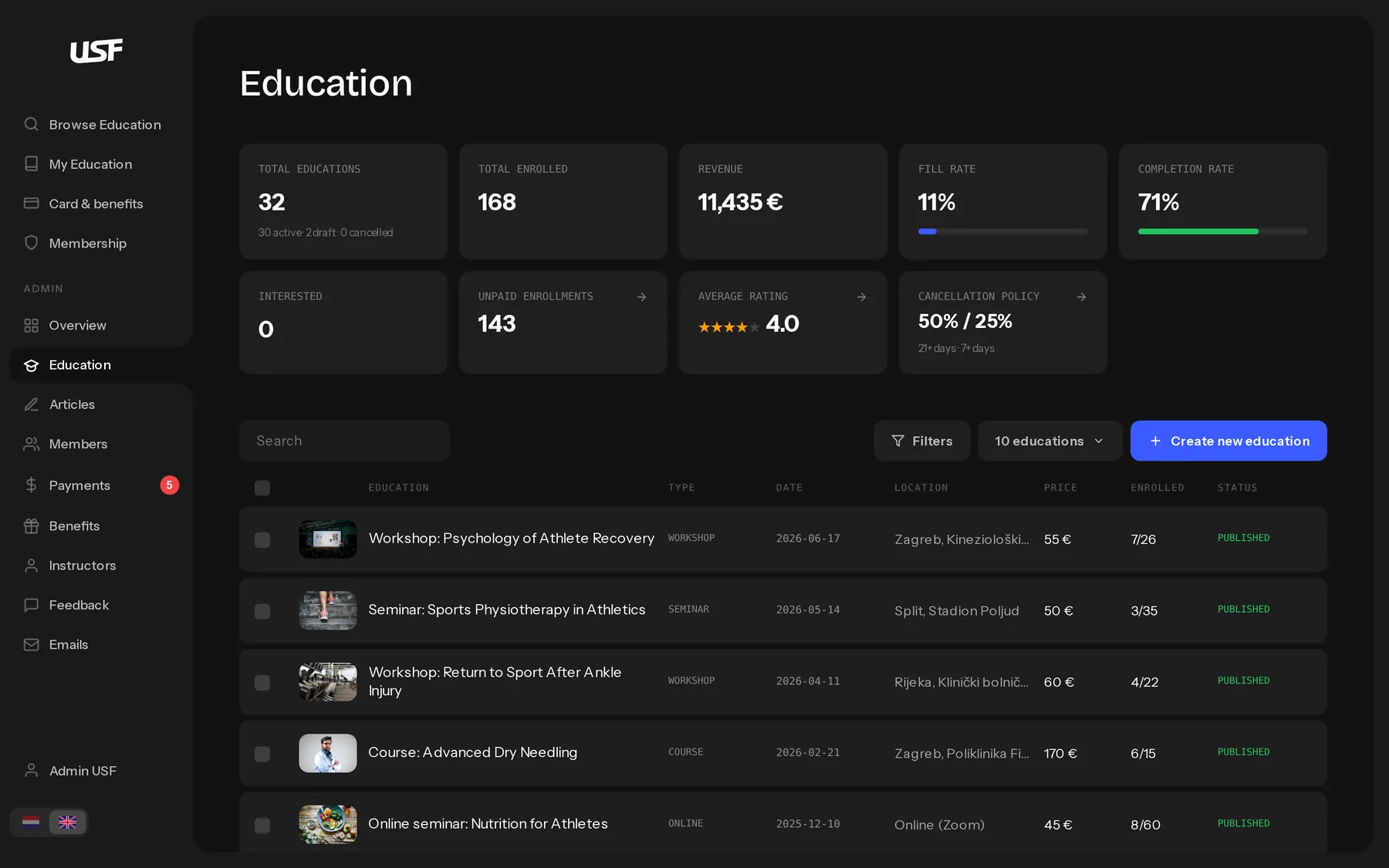
One design language, enforced in writing: every section heading is 18px/500, and there is no second one. No outlined controls; a control carries a tinted fill instead of a border. Lists are boxed rows on a plain background, never a box wrapped around boxes. Search sits inside the list it searches, so its placeholder just says "Pretraži", because naming the list again would say nothing.

When a screen and a rule disagreed, we changed one of them deliberately, never both, never quietly. That's what keeps 1.2 MB of interface in a single file feeling like one product instead of twenty-nine rounds of patches.

USF admin educations list with stat cards, filters and publish statuses

The admin's education list: stat cards, statuses, filters, and the same type rules as every other screen

What this is, and what it isn't

It's a prototype by design. There is no backend; the entire association state lives in versioned browser storage, seeded with two years of history. That's the point: the client can click through the whole product (enrolment, refunds, certificates, emails) before paying for any infrastructure. When the real build comes, the prototype is the spec, and it's a spec you can use, not read.

What came out

A clickable whole, not a deck

The client reviews each round the same hour it's built, in the real thing, not in a slide export of it. Objections surface while they're still cheap.

A live brand

The guidelines site is public on GitHub Pages with files anyone can download. The logo, palette and type rules exist independently of the prototype.

A reusable method

Rounds, sketches first, scripted checks, a written handoff. The next AI-built project starts with a proven process instead of a blank page.

What I learned

Precision is the deliverable

AI executes exactly what's said, at speed. Vague notes produce confident, wrong screens. My real output became precise language: what's wrong, where, and what "right" would mean.

Taste has to be written down

The AI matched my rules, never my instincts. So instincts became rules: one heading size, colour only as meaning, no boxes in boxes. If it matters, it's written, or it drifts.

Verification is design work

Computed styles over eyeballs. Scripted walks through every panel. Reproduce a bug before fixing it, and ask which clicks. QA stopped being someone else's job and became part of mine.

The judgment stays human

AI never once said "this card has too much on it." Ranking what matters, saying no, choosing the one number a member needs: that's still the designer's job. More than ever.

Measure, don't look.

Why this matters

"Designer, PM, developers, budget" "A designer, an AI, and a method"

This project isn't in my portfolio because the code is impressive. It's here because it changes what a designer can promise: a real, testable product, not a prototype of one, before a development team is ever hired. The client feels the whole thing early, and the eventual build inherits a living spec instead of a PDF.

It also sharpened the part of the job AI can't take: deciding. Every screen in USF is a stack of small judgments: what leads, what stays quiet, what isn't there at all. AI made those judgments visible faster than any team I've worked with. It never made one for me.

About this project

Curious about the details? Ask the AI assistant anything about this case study: the process, decisions, challenges, or outcomes.

Ask AI about this project

Hi\! I can tell you all about this case study. Pick a question or type your own.

More work

Open →